Overview:
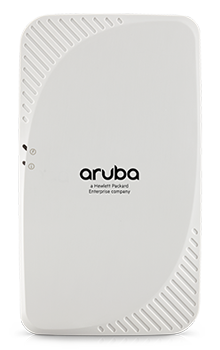
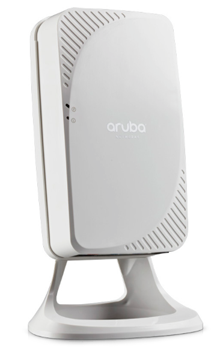 The multifunctional and affordable AP-205H access point (AP) combines high-performance wireless mobility with wired Gigabit Ethernet access in a surprisingly compact device. This compact and cost-effective dual-radio AP easily mounts to a standard data wall-box and uses the existing structured cabling system to provide secure wired and wireless network access in dormitories, classrooms, hotels, medical clinics and multitenant environments.
In addition, using a unique mount kit accessory, the AP-205H can easily be converted to a desk mounted AP to provide the same benefits for branch offices and teleworkers. Capable of delivering high-performance Wi-Fi services to multiple rooms, the 205H simplifies RF coverage planning and reduces WLAN deployment costs. The AP-205H is built to provide years of trouble-free operation and is backed by Aruba’s limited lifetime warranty.
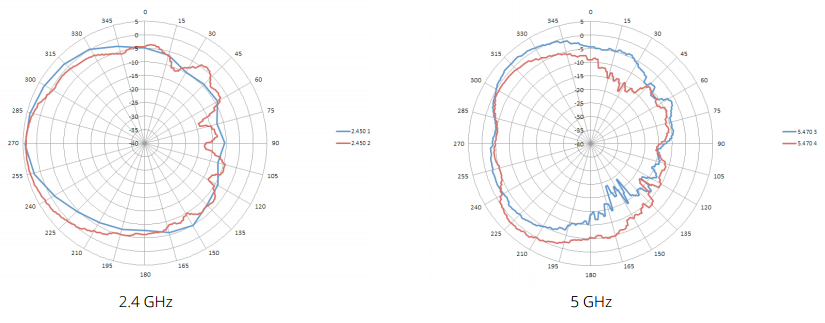
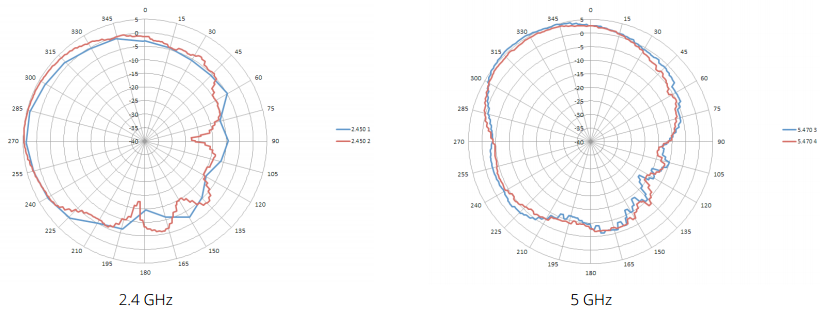
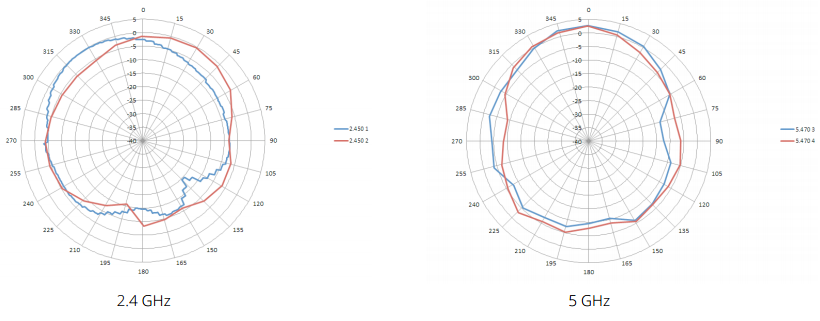
The 205H delivers wireless data rates of up to 867 Mbps to 5-GHz devices with 802.11ac technology leveraging two spatial MIMO streams while simultaneously supporting 2.4-GHz 802.11n clients with data rates of up to 400 Mbps. The integrated antennas of the 205H are optimized for the deployments with the AP mounted vertically on either a wall or desk. The antenna patterns are slightly directional, focusing RF energy to and from the area facing the front of the AP.
Three local Gigabit Ethernet ports are available to securely attach wired devices to your network. One of these ports is also capable of supplying PoE power to the attached device. The 205H itself receives power from either an AC-to-DC adapter accessory or from the switch it attaches to, using PoE via the uplink Gigabit Ethernet port.

Get a big performance advantage
Patented ClientMatch technology improves performance and eliminates sticky client behavior while roaming.

Protect service quality over the air
AppRF technology enables prioritization and policy enforcement for business-critical enterprise apps like Microsoft Lync.

You have the freedom to choose
The AP-205H can be deployed as a wall-mounted hospitality AP or converted to a desk mounted remote AP.
Benefits:
Two devices in one
The 205H ships with everything you need to deploy it as a wall-mounted hospitality AP, attaching directly to a standard single gang data wall-box. In addition, using an optional accessory stand, the 205H can easily be converted to a desk mounted remote AP.
Advanced Cellular Coexistence (ACC)
Aruba’s Advanced Cellular Coexistence (ACC) feature enables WLANs to perform at peak efficiency by minimizing interference from 3G/4G LTE networks, distributed antenna systems and commercial small cell/femtocell equipment.
Wi-Fi client optimization
To eliminate sticky client behavior while users roam, Aruba APs feature patented ClientMatch technology, which continuously gathers session performance metrics from mobile devices. If a mobile device moves away from an AP or if RF interference impedes performance, ClientMatch automatically steers the device to a better AP.
Quality of service for unified communication apps
Aruba APs support priority handling and policy enforcement for unified communication apps, including Microsoft Lync with encrypted videoconferencing, voice, chat and desktop sharing.
Choose your operating mode
Aruba offers a choice of AP operating modes to meet your unique management and deployment requirements:
- Controller-managed mode.
When managed by Aruba Mobility Controllers, Aruba APs offer centralized configuration, data encryption, policy enforcement and network services, as well as distributed and centralized traffic forwarding. Please refer to the Aruba Mobility Controller data sheets for more details.
- Aruba Instant mode.
In Aruba Instant mode, a single AP automatically distributes the network configuration to other Instant APs in the WLAN. Simply power-up on Instant AP, configure it over the air, and plug in the other APs – the entire process takes about five minutes. If WLAN requirements change, a built-in migration path allows instant APs to become part of a WLAN that is managed by a Mobility Controller.
Simplify deployment with Aruba
Activate For large installations across multiple sites, the Aruba Activate service significantly reduces deployment time by automating device provisioning, firmware upgrades, and inventory management. With Aruba Activate, Instant APs are factory-shipped to any site and configure themselves when powered up.
Wireless Radio Specifications:
| RF Performance Table |
| |
Maximum transmit power (dBm) per transmit chain |
Receiver sensitivity (dBm) per receive chain |
| 2.4 GHz - 802.11b |
| 1 Mbps |
18.0 |
-97.0 |
| 11 Mbps |
18.0 |
-89.0 |
| 2.4 GHz - 802.11g |
| 6 Mbps |
18.0 |
-93.0 |
| 54 Mbps |
15.5 |
-75.0 |
| 2.4 GHz - 802.11n HT20 |
| MCS0/8 |
18.0 |
-92.0 |
| MCS7/15 |
14.0 |
71.0 |
| 2.4 GHz - 802.11n HT40 |
| MCS0/8 |
18.0 |
-89.0 |
| MCS7/15 |
14.0 |
-68.0 |
| 2.4 GHz - 802.11ac VHT20 |
| MCS0 |
18.0 |
-92.0 |
| MCS8 |
12.5 |
-68.0 |
| 2.4 GHz - 802.11ac VHT40 |
| MCS0 |
18.0 |
-89.0 |
| MCS9 |
12.0 |
-63.0 |
| 5 GHz - 802.11a |
| 6 Mbps |
16.0 |
-95.0 |
| 54 Mbps |
15.0 |
-77.0 |
| 5 GHz - 802.11n HT20 |
| MCS0/8 |
16.0 |
-94.0 |
| MCS7/15 |
14.5 |
-71.0 |
| 5 GHz - 802.11n HT40 |
| MCS0/8 |
16.0 |
-90.0 |
| MCS7/15 |
14.0 |
-68.0 |
| 5 GHz - 802.11ac VHT20 |
| MCS0 |
16.0 |
-94.0 |
| MCS8 |
14.0 |
-69.0 |
| 5 GHz - 802.11ac VHT40 |
| MCS0 |
16.0 |
-89.0 |
| MCS9 |
14.0 |
-63.0 |
| 5 GHz - 802.11ac VHT80 |
| MCS0 |
16.0 |
-86.0 |
| MCS9 |
14.0 |
-60.0 |
Numbers above exclude antenna gain. Table shows maximum capability of the radios. Transmit power may be restricted in software to comply with local regulatory rules.